
Get a summary of this article with your favorite AI:
Disclaimer: BatchDialer does not offer legal advice. This article is for educational purposes only. Consult a legal professional before cold calling prospects or using a real estate dialer.
Key Takeaways:
- Real-time coaching through Listen In, Whisper, and Barge In features shortens the feedback loop, helping agents improve faster than with post-call reviews alone.
- BatchDialer’s dashboard provides managers with visibility into key metrics such as connect rate, call duration, and abandon rate, making it easier to spot coaching opportunities in real time.
- Whisper mode lets managers guide agents mid-call without the contact ever knowing, building agent confidence without disrupting the conversation.
Your call center team is only as strong as its weakest link, so providing ongoing agent training and coaching is essential. But how do you assess an agent’s performance when they’re on a live call? The answer is simple: Use BatchDialer’s live monitoring and coaching features.
Why Real-Time Coaching Matters in Real Estate Call Centers
Real-time coaching shortens the time it takes to improve call quality, allowing you to scale your business faster. Instead of waiting for a post-call review, you can give agents helpful advice when they need it.
For example, an agent might struggle with confidence or sticking to a call script. A quick word of encouragement or a reminder could be all they need to get back on track. This is especially important in a fast-moving sales environment where every moment counts.
Below, we’ll dive into different ways you can use BatchDialer to coach agents mid-call.
Monitoring Live Calls to Improve Visibility and Accountability
As a call center manager, you can monitor live calls directly from BatchDialer’s dashboard. It displays the following data points based on the filters you apply:
- Outbound Calls: The total number of outbound calls made.
- Connected Calls: How many of the calls made were connected with a contact.
- Average Call Duration: How long connected calls last on average.
- Average Agent Wait Time: How long your agents wait to be connected with a contact on average.
- Abandon Rate: The percentage of contacts being dropped from a connected call.
- Active Campaigns: How many campaigns are currently being actively dialed on.
- Leads Generated: How many contacts turned into leads.
- Connect Rate: The percentage of calls that are connected to a live contact.
- Dialing Time: How long your team has dialed in total.
- Average Calls Per Agent: How many calls each agent is making on average.
- Calls Per Connect: How many calls does it take to connect with a contact on average.
- Voicemails Reached: How many contacts’ voicemails have been reached in total.
With so much data available at a glance, you can identify coaching opportunities in real time.
How to Whisper and Coach Agents Without Interrupting a Live Call
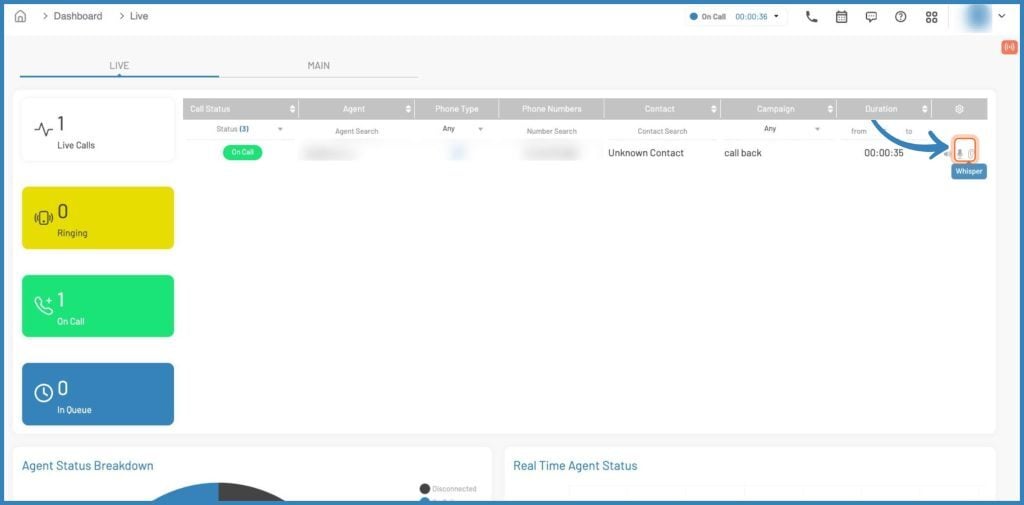
Imagine you want to give an agent a tip during a live call without disrupting the conversation. BatchDialer’s “Whisper” mode lets you do just that. By clicking on the ear icon next to the call of your choice, you can ‘whisper” to the agent while remaining inaudible to the contact.
This feature can be useful when onboarding new agents, reinforcing scripts, and helping agents handle objections in real time. Whisper coaching builds confidence without breaking rapport.
How to use the Barge In Feature When Conversations Need Support
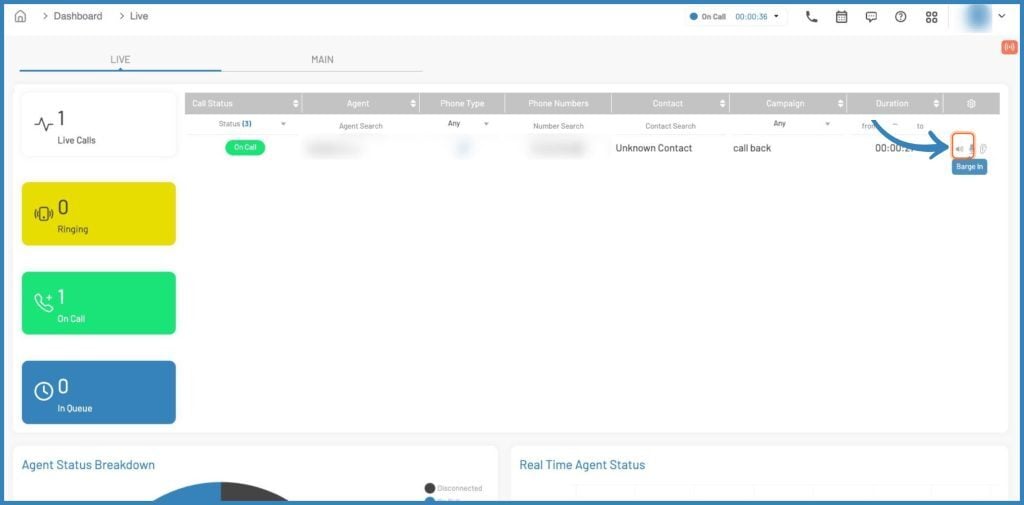
The “Barge In” feature lets you join a live call so the agent and the contact can hear and speak with you. Simply click on the microphone icon next to a call in your dashboard.
Some appropriate use cases for this feature may include salvaging critical conversations, handling escalations, and demonstrating proper objection handling. That said, Barge should not be used as a micromanaging tool. It’s meant as a training and support tool.
Listen-In: Reviewing Calls Without Influencing the Outcome
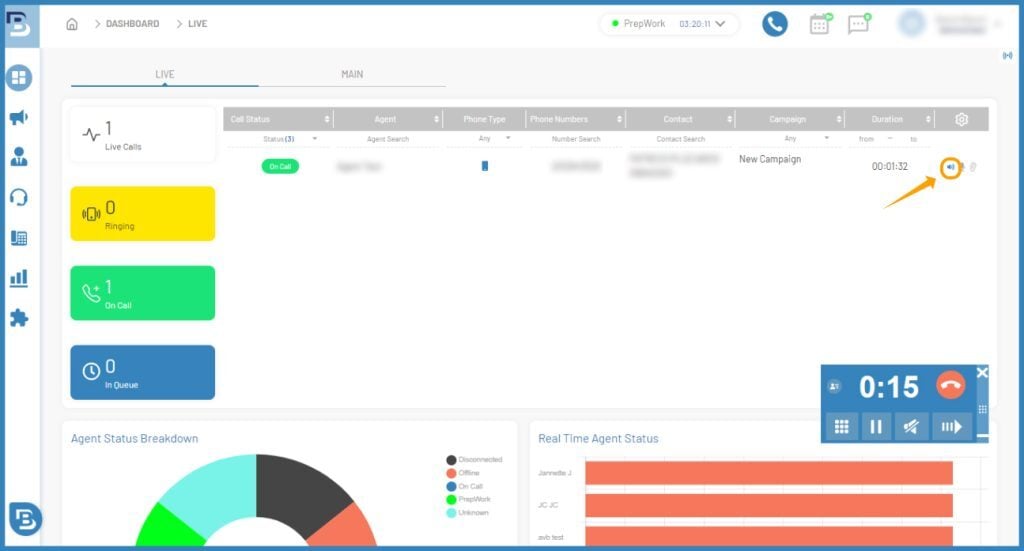
Finally, “Listen In” mode lets you listen to a live call without the contact or the agent hearing you. The button for this option is a speaker icon next to the call you want.
Listening in on a call can be ideal for maintaining quality assurance (QA) standards, script compliance, and identifying coaching trends. It provides unbiased insight into the agent’s performance since they (and the contact) don’t know you’re listening.
Using Call Monitoring for Faster Onboarding and Skill Development
All three of BatchDialer’s coaching modes (Whisper, Barge In, and Listen In) can help you accelerate your team’s onboarding and skill development. After all, they help you coach multiple agents live, reinforce best practices, and reduce ramp-up time for new hires.
For instance, let’s say you review a call after the fact by listening to a recording. By then, the call is over, and the agent can’t implement your feedback until their next call. However, live feedback during the call shortens the feedback loop, enabling the agent to improve faster.
Reinforcing Coaching With Reporting and Performance Data
Ultimately, BatchDialer’s live coaching tools complement the admin dashboard.
By monitoring key metrics such as connect rate, call duration, and call outcomes, you can determine which calls to track. After you provide feedback, you can see whether key metrics improve and whether your coaching was effective.
Pro Tip: Use BatchDialer’s report scheduling features to get daily, weekly, or monthly reports on your campaigns, recent contacts, agents, and numbers.
Ready to take your call center team to the next level? Start coaching agents in real time today and keep every call on track with BatchDialer.
Start your free 7-day trial now!
Frequently Asked Questions (FAQs)
What is BatchDialer call monitoring, and how does it work?
BatchDialer call monitoring allows call center managers to observe live agent calls directly from the platform’s dashboard. You can also choose between the Listen In, Whisper, and Barge In monitoring modes, which involve different levels of intervention.
What are the Whisper and Barge In calling features in BatchDialer?
Whisper lets you privately coach an agent during a live call without the contact hearing you, while Barge In lets you join the conversation so both the agent and the contact can hear you.
How can real estate call center training improve call quality?
Structured real estate call center training combined with live coaching tools helps agents handle objections, stick to scripts, and build confidence faster.
Is BatchDialer a good software for real estate call center teams?
Yes, BatchDialer is designed for outbound sales teams, making it well-suited for real estate call centers. It’s call coaching features for real estate teams, combined with robust reporting and campaign management tools, which help managers scale performance across their entire team.
How do I use BatchDialer to improve my real estate team’s outbound call performance?
Start by monitoring key dashboard metrics, such as connect rate and call duration, to identify which agents need support. From there, use Listen In mode to observe calls, Whisper mode to guide agents discreetly, and Barge In to step in when a conversation needs immediate support.
Does BatchDialer provide reporting tools to track call quality improvements over time?
Yes, beyond its live monitoring features, BatchDialer offers report scheduling so managers can receive daily, weekly, or monthly performance data on agents, campaigns, and call outcomes, making it easier to measure which training efforts are actually moving the needle.