

Get a summary of this article with your favorite AI:
Disclaimer: BatchDialer is designed to support responsible outreach. However, customers should still take necessary steps to ensure their cold outreach complies with applicable laws and obtain any required permissions.
| Quick Answer: A call disposition describes the outcome of a call. Sales teams use them to quickly label conversations, streamlining and standardizing call reporting. Common call dispositions include “hot lead,” “follow-up,” “not interested,” and “do not contact.” |
Boost your team’s productivity and focus on what matters most—connecting with prospects. By implementing effective call dispositions, you can effortlessly streamline your outbound calling workflows. Read on to discover how call dispositions help you minimize administrative tasks so you can dedicate more time to meaningful conversations.
Key Takeaways:
- Call dispositions label the outcome of every call, helping sales teams organize prospects and standardize reporting across the team.
- Consistent, well-defined dispositions can help prevent lost leads and wasted effort by ensuring agents always know who to follow up with and who not to contact.
- BatchDialer’s AI call results automatically apply the correct disposition after each call, reducing manual admin work and freeing up more time to talk to prospects.
What Is a Call Disposition?

A call disposition is a label assigned to a phone call conversation. Sales agents use them to keep prospects and interactions organized, ensuring each follows the proper workflow.
For example, a call in which the prospect says they’re “not interested right now” could merit a “follow-up” disposition, assigning the contact to a follow-up call queue. Conversely, a prospect who says they’re “not interested and don’t contact me again” is better served by a “do not contact” label, so other agents know not to reach out again in the future.
Why Call Dispositions Matter
Without consistent call dispositions, you risk letting prospects fall through the cracks, leaving money on the table, and ruining your business reputation.
Here’s how: Imagine you don’t use call dispositions, or you use the wrong ones. Your conversations and prospect information will then be disorganized or false. As a result, you may fail to follow up with interested leads, leading to lost income opportunities. Conversely, you may follow up with the wrong leads, frustrating them and earning you a poor reputation in business.
Common Dispositions to Start Using
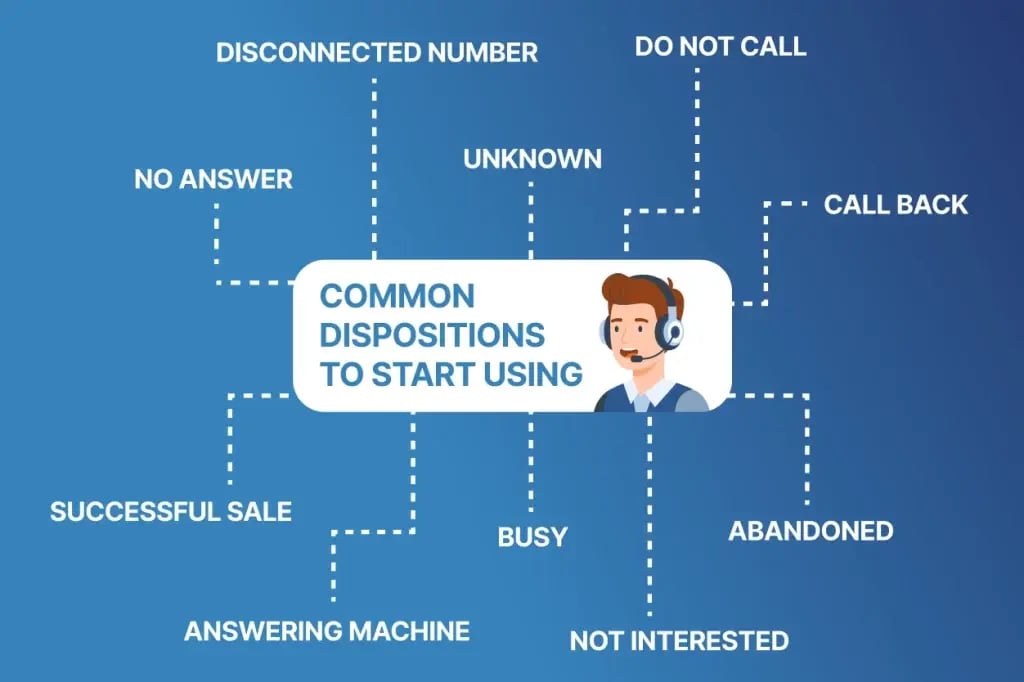
Now that you know what call dispositions are and why they matter, here are some common ones to consider integrating into your own call workflow:
| Call Disposition | When to assign |
| Abandoned | When the recipient answers, but there isn’t an agent available to take the call |
| Hot Lead | When the prospect shows the highest level of interest and is ready to move forward. |
| Answering Machine | When the call goes to voicemail |
| Busy | When the caller receives a busy signal |
| Call Back | When the prospect expresses interest but has yet to commit to a deal |
| Disconnected Number | When the number is no longer assigned to a phone carrier subscriber |
| Do Not Call | When a prospect requests not to be contacted or is listed on the DNC registry |
| No Answer | When the call recipient never answers |
| Not interested | When the prospect says they’re not interested |
| Successful Sale | When a prospect completes a successful sale |
| Unknown | When the appropriate call disposition is unknown |
Best Practices for Creating Consistent Disposition Categories
To get the most out of your call disposition categories, follow these best practices:
Keep Dispositions Mutually Exclusive
Each disposition should describe a single clear outcome so agents never have to choose between two similar-sounding options, such as “Interested” and “Follow Up.”
Limit the Total Number of Dispositions
Too many disposition options can slow agents down and lead to more mislabeling. Aim for the smallest set of dispositions while still covering all your workflows.
Use Clear, Standardized Naming Conventions
Avoid ambiguous or jargon-filled disposition names to avoid confusion. You want every agent to interpret each label the same way, regardless of tenure or team.
Map Each Disposition to a Specific Next Action
A disposition isn’t just a label. It should trigger a defined next step (e.g., “Call Back” should route to a follow-up queue and “Do Not Call” should permanently suppress the number).
Train Your Team on Definitions and Edge Cases
Ensure team members understand when to apply each label and provide examples of how to handle borderline cases (e.g., when the call goes to a voicemail that leaves a callback number).
Regularly Audit Disposition Usage
Periodically review call recordings and notes against the assigned dispositions to catch any mistakes or recurring mislabeling issues.
Revisit and Refine Categories Over Time
As your outreach strategy or compliance requirements evolve, update your call dispositions rather than letting outdated ones linger.
Streamline Post-Call Workflows with BatchDialer’s AI Call Results
BatchDialer takes call dispositions a step further by automatically applying the relevant call result after each call. The platform’s built-in AI Tool listens in on calls to determine and apply the appropriate disposition so you don’t have to!
Create Your Own Call Dispositions with BatchDialer
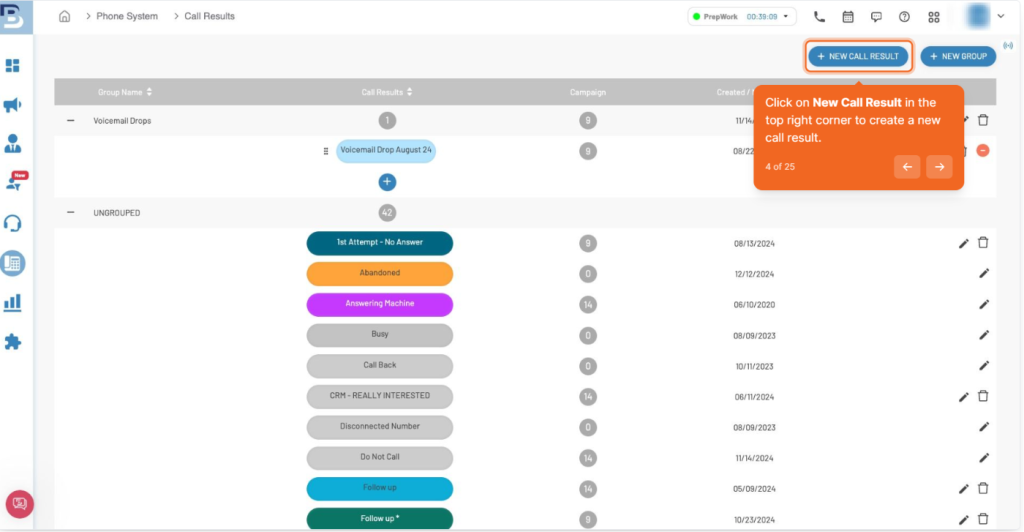
With BatchDialer, building a set of call dispositions is easy.
First, select Phone System from the main menu and then click Call Results. You’ll see all of BatchDialer’s default call results listed.
To create a new call result, click the New Call Result button in the top-right corner. From there, you can edit the following:
- Call Result Name: Name the disposition.
- Number Group: Assign the disposition to a specific Number Group.
- Campaigns: Assign which campaigns will have access to the disposition.
- Call Result Group: Assign dispositions to a call result group for easy selection.
- Display on New Campaign Page: This makes a call result visible when you create a new campaign in the future.
Once you’ve created your call dispositions, it’s time to build the workflows that each will initiate. Here are the different rules you can assign to dispositions in BatchDialer:
- Do Not Redial Contact: When this rule is attached to a call result, it indicates that there is no reason to redial any of the contact’s numbers (e.g., because the agent already connected and spoke to the right person).
- Do Not Redial Number: This indicates there is no reason to redial a specific number (e.g., because the agent connected with the contact at a different number).
- Add Contact to DNC: The entire contact will be added to your Do Not Contact list.
- Add Number to DNC: The specific number will be added to your Do Not Contact list.
- Mark As Lead: If your CRM is connected to the campaign, the contact will be pushed to your CRM.
- Send to Email: This lets you send the prospect to a team member’s email address.
- Schedule Callback: This schedules a time to reach out to the prospect again (e.g., after a set period in the campaign’s call queue).
- Send Voicemail: This sends a pre-recorded “voicemail drop.”
- Add to Campaign: This lets you assign prospects to a specific campaign (e.g., if they would be a better fit in a different campaign).
- Add to List: This lets you add the prospect to an existing list or create a new one (e.g., a callback list).
Start Your Free BatchDialer Trial Today
Ready to optimize your call workflow with dispositions? BatchDialer makes it easy.
But don’t take our word for it. Try it yourself!
Start your 7-day free trial of BatchDialer now!
Frequently Asked Questions (FAQs)
What is a call disposition?
A call disposition is a label assigned to a call that describes its outcome (like “not interested,” “call back,” or “do not call”), helping sales teams organize contacts and standardize reporting.
What’s the difference between a call disposition and a call outcome?
They’re essentially the same. “Call outcome” and “call result” are often used interchangeably with “call disposition” to describe how a call went.
Why are call dispositions important in cold calling?
In high-volume cold calling, consistent dispositions help agents quickly track who to follow up with, who’s not interested, and who should never be called again—minimizing wasted effort and compliance risks.
How do call dispositions improve sales reporting?
Standardized dispositions make sales reporting more accurate by giving managers clean, consistent data on call outcomes across agents and campaigns.
How many call dispositions should my sales team use?
Most teams do best with a small, focused set of dispositions: enough to cover common outcomes without overwhelming agents or leading to inconsistent labeling.
Can AI automatically assign call dispositions?
Yes. BatchDialer uses AI to listen to calls and automatically apply the appropriate disposition, removing the need for agents to manually log outcomes.