

Get a summary of this article with your favorite AI:
Disclaimer: BatchDialer does not offer legal advice. This article is for educational purposes only. Consult a legal professional before cold calling or using an auto dialer.
Key Takeaways
- The best real estate auto dialers do more than automate calls—they improve productivity with multiple dialing modes, AI-powered workflows, and streamlined lead management.
- Built-in compliance tools, caller reputation protection, and real-time reporting can help teams improve answer rates, simplify outreach, and optimize campaign performance.
- BatchDialer combines outbound calling, lead management, AI, compliance, and real estate integrations into one platform designed for investors, wholesalers, agents, and acquisition teams.
Every conversation with a motivated seller starts with a phone call—but getting to that conversation often takes longer than it should. According to Salesforce’s latest State of Sales report, sales representatives spend only 36% of their average workweek actively selling, while the remaining 64% is spent on non-selling activities like administrative work, prospecting, CRM updates, and meetings.
That’s where the right calling solution can make a difference for call center teams. In this guide, we’ll explain what a real estate auto dialer is, the benefits it offers, and the key features to look for before choosing one for your business.
What Is an Auto Dialer Software?

An auto dialer is an outbound calling solution that automates dialing phone numbers from a contact list. Instead of manually entering each number, users can move seamlessly from one call to the next, saving time and reducing repetitive work.
Depending on the dialing mode, an auto dialer can automatically place calls, connect agents to live answers, or quickly move to the next contact. This allows real estate investors, acquisition teams, and sales professionals to spend less time dialing and more time having meaningful conversations with prospects.
Pros and Cons of Using an Auto Dialer
Auto dialer software can significantly improve outbound calling efficiency. As with any business tool, it’s important to understand both its advantages and limitations.
Pros of Using an Auto Dialer
- Increased Productivity: Automates repetitive dialing tasks, allowing agents to spend more time talking to real people.
- Higher Call Volume: Move through lead lists faster without manually entering every phone number.
- Better Lead Management: Automatically log calls, dispositions, and notes for easier follow-up.
- Built-in Compliance Tools: Many auto dialers include features such as Do Not Call (DNC) scrubbing, caller ID authentication, and call recording to support responsible outreach and reduce compliance risks.
- Improved Team Performance: Reporting and analytics help managers monitor activity and coach agents.
- Scalable Outreach: Supports growing teams and higher calling volumes with consistent workflows.
Cons of Using an Auto Dialer
- Learning Curve: New users may need time to understand dialing modes, campaign settings, and reporting tools.
- Requires a Clear Calling Strategy: Results depend on lead quality, outreach cadence, and consistent follow-up.
- Advanced Features May Cost More: AI tools, caller reputation management, and premium integrations may only be available on higher-tier plans.
- Not All Platforms Are Created Equal: Some auto dialers lack features such as CRM integrations, caller reputation monitoring, and compliance tools, making it important to evaluate your options before buying.
Is an Auto Dialer the Right Choice for Your Team?
Not sure if an auto dialer is the right fit? Start by finding the use case that best matches your business. If any of these feel familiar, an auto dialer could help streamline your outreach and save valuable time.
- You’re a real estate investor or wholesaler looking to connect with motivated sellers, absentee owners, expired listings, or FSBOs without spending hours manually dialing lead lists.
- You’re part of an insurance or financial services team following up with leads, scheduling consultations, and maintaining regular contact with prospects and clients.
- You manage a healthcare or appointment-based business that relies on outbound calls for appointment reminders, patient follow-ups, or care coordination.
- You lead a sales team or call center where agents spend much of the day prospecting, qualifying leads, or managing outbound campaigns.
- You’re a growing business with increasing call volume and need a more efficient way to manage outreach without adding unnecessary administrative work.
If you identified with one or more of these scenarios, the next step is to choose an auto-dialer that aligns with your team’s workflow, outreach goals, and growth plans.
Features to Look for When Choosing an Auto Dialer
As you compare your options, here are the features that matter most:
Multiple Dialing Modes
Not every calling campaign has the same goal. Look for an auto dialer that offers multiple dialing modes so you can adapt your outreach to your team’s workflow, lead quality, and campaign objectives.
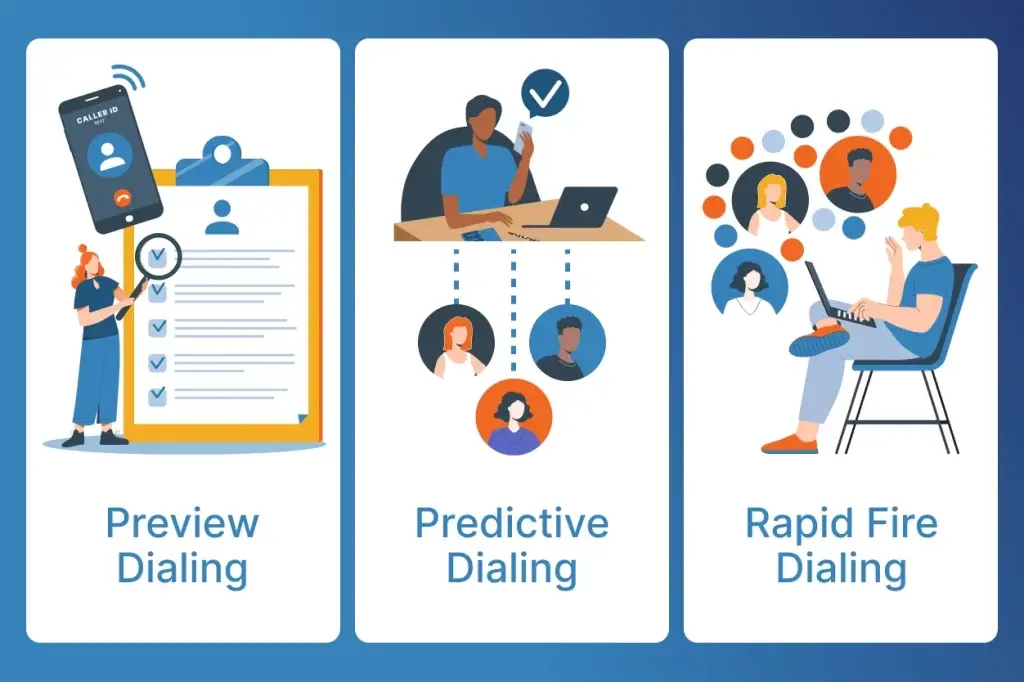
- Predictive Dialing: Best for high-volume prospecting. Automatically dials multiple phone numbers and connects agents only when a live prospect answers, helping reduce idle time and maximize conversations.
- Rapid Fire Mode: Best for maximizing outreach efficiency. Automatically places another outbound call as soon as a dialing line becomes available, helping experienced teams move through campaigns faster and increase conversations per hour.
- Preview Dialing: Best for personalized outreach. Gives agents complete control over each call by displaying contact details, property information, previous interactions, notes, and call history from a single screen before dialing, making it easier to personalize conversations and build rapport.
Why it matters: The ability to switch between dialing modes gives your team the flexibility to match the right calling strategy to every campaign. Whether you’re prioritizing speed, personalization, or a balance of both, the right dialing mode helps improve productivity and create more meaningful conversations.
Built-in Compliance Features
Responsible outbound calling starts with the right safeguards. When comparing auto dialers, look for built-in compliance features that help simplify outreach, reduce manual effort, and support applicable calling regulations.
- DNC Scrubbing: Screen lead lists against the Federal Do Not Call (DNC) Registry before launching a campaign.
- Litigator Scrubbing: Identify and exclude known litigators and high-risk phone numbers from your outreach.
- Internal Suppression Lists: Maintain your own Do Not Call lists and exclude specific phone numbers, area codes, or states from future campaigns.
- Compliance-Friendly Workflows: Configure campaigns with built-in tools that help your team follow responsible outreach practices.
Why it matters: Built-in compliance tools help reduce manual list management and support responsible outbound calling by making it easier to follow applicable regulations, including TCPA requirements.
Caller Reputation Protection
Even the best lead list won’t generate results if prospects see your calls as spam or ignore unfamiliar numbers. Look for an auto dialer that includes caller reputation tools to help improve caller trust, support stronger answer rates, and keep your outreach running smoothly.
- Phone Reputation Monitoring: Monitor your outbound phone numbers across multiple reputation providers to identify potential spam flags before they affect your campaigns.
- Automatic Number Replacement: Automatically replace monitored phone numbers that become flagged as spam, helping minimize campaign interruptions and maintain consistent outreach.
- Remediation or Business Verification: Built-in business verification that helps protect your current and future phone numbers, improve caller trust, and reduce the likelihood of spam labeling—all at no additional cost.
- Smart Local Presence: Automatically display a local caller ID that matches the prospect’s area code using legitimate phone numbers associated with your account. A familiar local number can help improve answer rates while maintaining a compliant calling experience.
Why it matters: Caller reputation directly impacts answer rates. The above features help ensure your calls are more likely to reach prospects instead of being ignored or labeled as spam.
CRM & Lead Management
Look for a platform that integrates with your CRM, simplifies lead management, and makes it easy to move prospects from lead generation to outreach.
- CRM Integrations: Connect with popular platforms such as HubSpot, PODIO, and FollowUpBoss to keep contact, call activity, and follow-up information in sync across your workflow.
- Built-in Lead Management: Organize contacts, log call outcomes, add notes, and manage follow-up activities without switching between multiple applications.
- Native Real Estate Software Integrations: Connect seamlessly with the lead generation platform of your choice, such as PropStream or BatchLeads, to move leads into your calling campaigns without manual exports or spreadsheet uploads.
- Built-in Lead Lists: Some platforms, such as BatchDialer, offer optional, ready-to-call lead lists that can be purchased directly within the platform. Access lead types such as Pre-Foreclosures, FSBOs, Vacant Properties, Tax Delinquent Properties, Absentee Owners, and Tired Landlords, then move them into calling campaigns in just a few clicks.
Why it matters: The less time your team spends importing contacts, organizing spreadsheets, and updating multiple systems, the more time they can spend having conversations and generating opportunities.
AI-Powered Call Workflows
The best auto dialers don’t just automate dialing—they also streamline the work that happens during and after every conversation. AI-powered features help agents stay focused on prospects by reducing manual note-taking, simplifying follow-up, and keeping call outcomes organized.
- Real-Time Call Guidance: Receive live prompts and suggested talking points to help keep conversations on track and handle objections more confidently.
- AI-Generated Call Summaries: Automatically create concise summaries after every call, reducing the need for manual note-taking.
- Automatic Call Results: Capture and categorize conversation outcomes consistently, enabling faster, more organized follow-up and reporting.
Why it matters: Every minute spent updating notes is a minute not spent talking to prospects. AI-powered workflows reduce repetitive administrative tasks, so your team can focus on more meaningful conversations.
Reporting & Team Performance
Look for reporting and coaching tools that give managers visibility into campaign performance, agent activity, and opportunities to improve productivity.
- Real-Time Dashboards: Monitor campaign activity, connect rates, agent status, and call performance as it happens.
- Campaign & Agent Reporting: Track key metrics like call volume, agent productivity, campaign performance, and recent contacts to identify what’s working and where improvements are needed.
- Heat Maps & Floor Maps: Visualize team activity and agent availability in real time, making it easier to manage workloads and monitor performance.
- Live Call Monitoring: Listen to live calls, whisper coaching tips to agents without the prospect hearing, or barge into conversations when additional support is needed.
- Scheduled Reports: Automatically deliver performance reports to managers and stakeholders, keeping everyone informed without manual reporting.
Why it matters: Continuous improvement starts with visibility. Real-time reporting and live coaching tools help managers identify trends, coach agents more effectively, and optimize campaigns for better results over time.
Bring It All Together With BatchDialer
Real estate outreach doesn’t stop at dialing a phone number. It starts with finding the right leads, continues through every conversation, and ends with consistent follow-up and performance tracking.
BatchDialer brings that entire workflow together in one place. With multiple dialing modes, AI-powered call workflows, caller reputation protection, built-in compliance, native real estate integrations, and real-time reporting, it gives your team the tools to work smarter from the first call to the final follow-up.
Ready to experience the difference? Start your 7-day free trial and discover how BatchDialer can help streamline your outbound calling workflow.
Frequently Asked Questions (FAQs)
What is an auto dialer for real estate?
A real estate auto dialer is an outbound calling solution that automatically dials phone numbers from a lead list, helping investors, wholesalers, agents, and acquisition teams spend less time dialing and more time speaking with property owners.
Which dialing mode is best for real estate?
It depends on your outreach strategy. Preview Dialing is ideal for personalized conversations, Predictive Dialing works best for high-volume prospecting, and Rapid Fire Dialing helps experienced teams maximize conversations during large outbound campaigns.
What features should I look for in an auto dialer?
Look for multiple dialing modes, built-in compliance tools, caller reputation protection, CRM and lead management capabilities, AI-powered workflows, reporting, and integrations with the software your team already uses.
How can an auto dialer help improve answer rates?
Many modern auto dialers include features such as phone reputation monitoring, business verification, Smart Local Presence, and automatic number replacement to help reduce spam labeling and improve caller trust.
Can an auto dialer integrate with my CRM and lead generation software?
Yes. Many platforms support CRM integrations and native connections with lead generation tools, making it easier to move contacts into calling campaigns and keep your outreach workflow organized.
Why is BatchDialer a good choice for real estate professionals?
BatchDialer is excellent for real estate professionals, combining multiple dialing modes, AI-powered call workflows, caller reputation protection, compliance tools, built-in lead management, native integrations with platforms like PropStream and BatchLeads, and real-time reporting to help teams streamline their outbound calling workflow.