
Get a summary of this article with your favorite AI:
Disclaimer: BatchDialer is designed to support responsible outreach, and customers should ensure their prospect connection practices comply with applicable laws and obtain any required permissions.
Key Takeaways:
- Automated call summaries capture key conversation points and next steps, reducing admin work and improving follow-up consistency.
- AI Coaching supports agents during live calls, helping improve conversations and reinforce best practices.
- Pairing predictive dialing with AI-powered summaries and campaign tracking helps reduce downtime and increase productive conversations.
What if every cold call were an opportunity to improve your team’s closing rate?
In outbound calling, small gaps add up faster than you expect. Missed notes, inconsistent conversations, and unclear follow-ups can cost opportunities over time.
BatchDialer’s AI features are designed to enhance that process, helping you communicate more effectively, automatically track outcomes, and follow up with clarity.
Read on to learn how BatchDialer’s AI features help you scale smarter, not just dial more.
How AI Is Transforming Outbound Calling

Outbound calling is no longer just about dialing more numbers. It is about improving the quality and consistency of every conversation.
With built-in AI features in BatchDialer, agents are supported throughout the entire call workflow. During the call, real-time guidance helps keep conversations on track. After the call, AI-generated summaries capture key details instantly, while automatic call resultsorganizes the call outcome without manual input.
Instead of slowing down to document or manage each interaction, agents can stay focused on conversations while the system handles the rest.
The result is a more structured and efficient workflow from first contact to follow-up.
Real-Time AI Coaching: Improve Conversations as They Happen
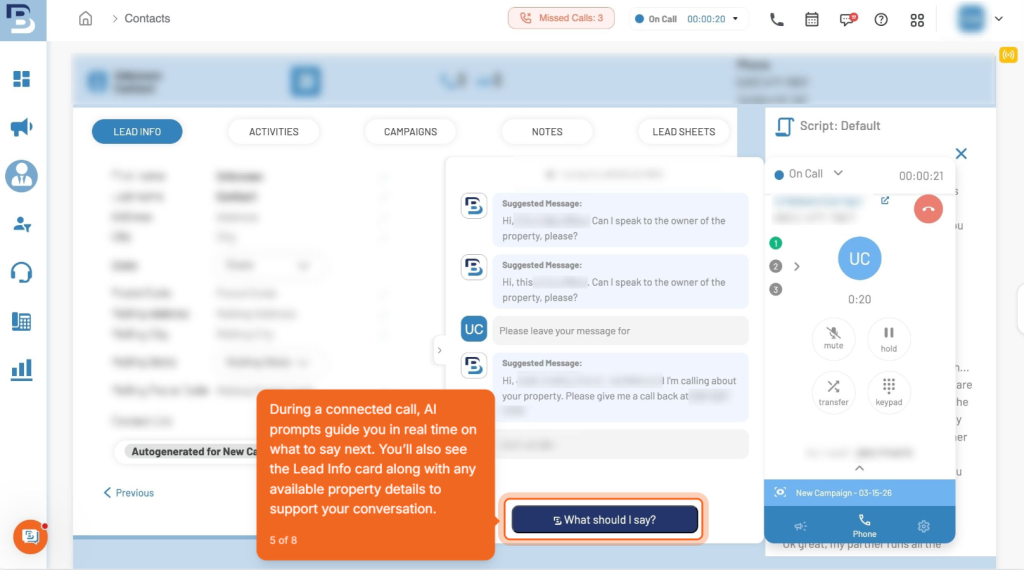
Real-time call guidance or AI Coaching helps agents stay on track during live conversations by providing prompts on what to say.
Instead of relying only on training or post-call reviews, agents can:
- Follow proven talking points during the call
- Navigate objections more confidently
- Maintain a consistent structure across conversations
This leads to clearer communication and more productive calls, especially for newer agents or growing teams.
Psst!: BatchDialer’s 7-day free trial now includes all AI features. Try them out and see the difference for yourself.
Automatic Call Results: Stay Organized Without Manual Work
After each call, BatchDialer automatically does call dispositions and labels the outcome based on the conversation.
This removes the need for agents to manually label every interaction and ensures your data stays clean and consistent.
With automatic call results, you can:
- Quickly understand call outcomes across campaigns
- Track performance without extra admin work
- Identify which lead segments are converting
Over time, this makes it easier to optimize your outreach strategy based on real results.
Watch: How Call Results Work in BatchDialer
AI-Generated Call Summaries: Eliminate Manual Notes
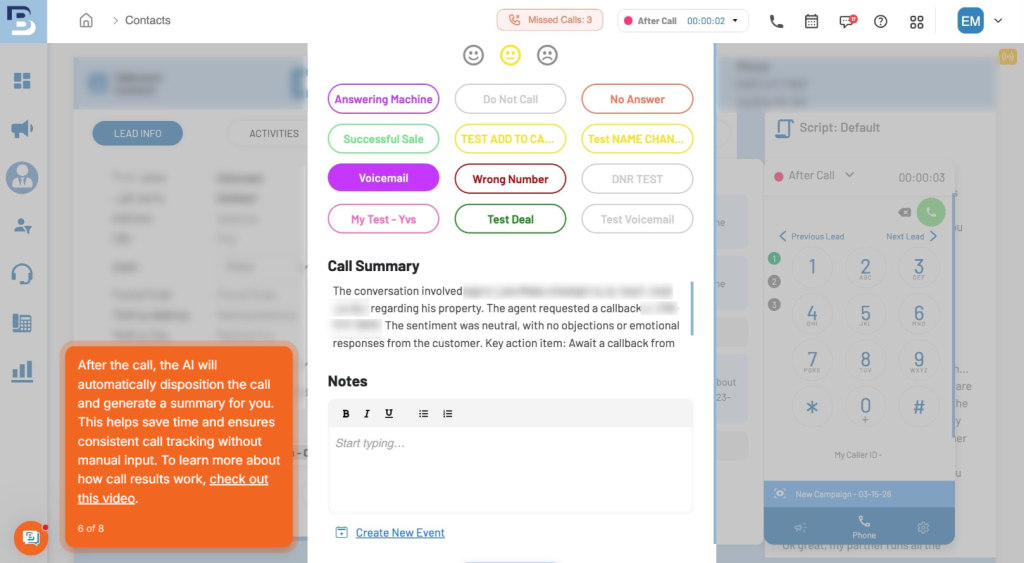
AI-generated Call Summaries in BatchDialer automatically capture key conversation points, objections, and next steps as soon as the call ends.
This helps you:
- Reduce time spent on manual note-taking
- Keep follow-ups consistent and accurate
- Maintain a clear record of every interaction
Think of call summaries as your built-in documentation system that works instantly after every call.
Predictive Dialing + AI Features: Maximize Efficiency Across Every Call
AI features are available within predictive dialing campaigns, helping you enhance efficiency while improving call quality after each call.
Predictive dialing allows you to call multiple leads at once and connects you to the first available conversation. This reduces idle time between calls and increases the number of live conversations you can have in a session.
When combined with real-time call guidance, agents stay on track, handle objections more effectively, and maintain consistency at scale, while AI-generated summaries capture key details for follow-up, and Automatic results keep outcomes organized, creating a faster, more structured workflow without added complexity.
Integrating PropStream Leads With BatchDialer
The quality of your conversations starts with the quality of your leads.
With PropStream, you can access over 160 million property records and use more than 165 filters to identify motivated sellers, including:
Once your list is ready, you can push it directly into BatchDialer using the Push to BatchDialer feature. This eliminates manual exports and ensures your information flows seamlessly into your calling campaigns.
Inside BatchDialer, you can launch predictive dialing campaigns supported by real-time guidance, automatic call results, and AI summaries.
Together, this creates a complete lead-to-conversation workflow.
Important: The real advantage is not just AI or dialing. It is the seamless integration of accurate contact info with AI-powered coaching and insights. That ecosystem is what improves conversion rates at scale.
Start Scaling Smarter
Use BatchDialer’s AI features to support your conversations, automate documentation, and improve how your team manages outreach.
Explore BatchDialer AI-Features with a 7-day free trial.
Frequently Asked Questions (FAQs)
What AI features does BatchDialer offer for outbound calling?
BatchDialer offers real-time call guidance, automatic call results, and AI-generated call summaries to help agents improve conversations and manage follow-ups more efficiently.
How does real-time call guidance improve call performance?
Real-time call guidance provides prompts during live conversations, helping agents stay on track, handle objections, and maintain consistency across calls, especially at higher volumes.
What is automatic call results in BatchDialer?
Automatic call results assign each call a label based on its outcome, making it easier to track performance, organize follow-ups, and manage campaigns without manual input.
How do AI-generated call summaries help outbound teams?
AI-generated call summaries capture key details, objections, and next steps immediately after each call, reducing manual note-taking and improving follow-up accuracy.
Are BatchDialer AI features included in all plans?
AI features are built directly into the Pro and Enterprise plans. New users can also access these features during the 7-day free trial.
How does BatchDialer integrate with PropStream?
PropStream integrates with BatchDialer through the Push to BatchDialer feature, powered by a direct API connection. Setup is simple. Once the API is connected between both platforms, you can push any skip-traced list from PropStream directly into BatchDialer.
From there, you can assign leads to campaigns and start predictive dialing without manual exports or uploads. This lets you move from lead generation to launching cold-calling campaigns at scale in just a few clicks.