

Get a summary of this article with your favorite AI:
Disclaimer: Feature availability, pricing, integrations, and plan inclusions are subject to change. Certain features mentioned in this article may only be available on specific BatchDialer plans or as optional add-ons. For the most current information, please visit the BatchDialer Pricing page or contact the BatchDialer team directly.
Successful outbound calling requires more than just a dialer. Teams need efficient calling modes, easy lead management, caller reputation protection, compliance safeguards, reporting, and seamless integrations that keep workflows moving.
BatchDialer brings these capabilities together in one platform. Whether you’re a real estate professional, sales team, or outbound contact center, the platform is designed to help you connect with more prospects while spending less time switching between tools.
In this guide, we’ll walk through every major BatchDialer feature and how each one contributes to a more efficient outbound calling operation.
Dialing Modes for Every Calling Strategy
BatchDialer offers multiple dialing modes designed to support different outreach strategies, helping users choose the right balance between efficiency and control.
Predictive Dialing Mode
Predictive Dialing mode in BatchDialer is a multi-line dialing feature that can call up to 5 numbers simultaneously and uses predictive algorithms to adjust dialing rates in real time based on agent availability. This helps teams move through lead lists faster and improves connection rates.
Once connected, BatchDialer’s AI features support agents during live conversations with Real-Time Call Guidance, Automatic Call Summaries, and Call Results, reducing manual work and improving consistency across campaigns.
AI Features in BatchDialer
- Real-Time Call Guidance – Receive live prompts and suggested talking points during calls to help keep conversations on track.
- Automatic Call Results conversation outcome, helping maintain consistent records and reporting.
- AI-Generated Call Summaries – Instantly generate call summaries for easy reference, follow-up, and documentation without manual note-taking.
Learn more about BatchDialer’s AI-Features and how they can help streamline your outreach workflow.
Here is a quick demo on how to create campaigns with Predictive Dialing mode.
| Predictive Dialer Is Best Suited For: – Real estate investors contacting motivated sellers – Wholesalers working large prospect lists – Sales teams conducting outbound prospecting campaigns – Call centers focused on high call volume – Insurance and home services companies generating new business |
Preview Dialing Mode
Preview Dialing mode in BatchDialer gives agents complete control over the calling Campaign process by allowing them to review lead information, such as contact information, property details, activity history, previous campaign interactions, and notes, before placing each call. This additional context helps agents tailor conversations and engage prospects more effectively.
Unlike automated dialing modes, calls are initiated manually, one contact at a time, making it ideal for conversations that require preparation and personalization.
When a prospect answers, their contact card automatically appears on screen, providing immediate access to relevant information and any scripts provided by an administrator. After the call, agents can quickly log Call Results, assign a mood, and leave notes before moving on to the next contact.
BatchDialer’s AI features further streamline the process by assisting with call summaries and dispositions, helping agents stay organized while reducing post-call administrative work.
Here is a quick demo on how to create campaigns with Preview Dialing mode.
Pro Tip: Learn how to create and run a Preview Dialing campaign with our step-by-step guide.
| Preview Dialer is Best Suited For: – Real estate investors and wholesalers working targeted lead lists – Real estate agents following up with FSBO and expired listing opportunities – Debt collection teams reviewing account details before outreach – Insurance and mortgage professionals conducting personalized conversations – Sales teams that require pre-call research and preparation |
Rapid Fire Dialing Mode
Rapid Fire Mode is an optional advanced setting within Predictive Dialing campaigns that further increases calling efficiency. Rapid Fire Mode modifies BatchDialer’s multi-line dialing algorithm to automatically place another outbound call as soon as a dialing line becomes available.
By continuously utilizing available lines, Rapid Fire Mode can reduce agent wait time and move through large lead lists more quickly and efficiently, making it ideal for high-volume outreach campaigns.
Watch this quick demo on how to enable Rapid Fire Mode while creating campaigns
Rapid Fire Mode is configured within Predictive Dialing under Advanced Configuration > Dialing Behavior. Since it operates within Predictive Dialing, agents use the same workflow for call outcomes, dispositions, notes, moods, lead management, and AI-generated call summaries.
| Note: Rapid Fire Mode is only available on BatchDialer Pro & Elite plans. |
| Best Suited For: – Dialing large campaigns quickly – Maximizing conversations per hour – Reducing agent wait time between calls – High-volume prospecting efforts – Teams focused on outreach efficiency – Experienced agents who don’t require extensive lead review before each call |
Consistent Call Management Across Every Dialing Mode
Whether you’re using Predictive Dialing, Preview Dialing, or Rapid Fire Dialing, BatchDialer provides a consistent post-call workflow. This allows agents to switch between dialing modes without learning new processes or disrupting existing workflows.
Caller Reputation & Deliverability
Making calls is only part of the equation. If your phone numbers are flagged as spam or your caller ID lacks credibility, even the most targeted campaigns can struggle to connect with prospects.
BatchDialer’s caller reputation and deliverability tools are designed to help users monitor phone number health, identify potential issues, improve caller trust, and maximize answer rates across outbound campaigns.
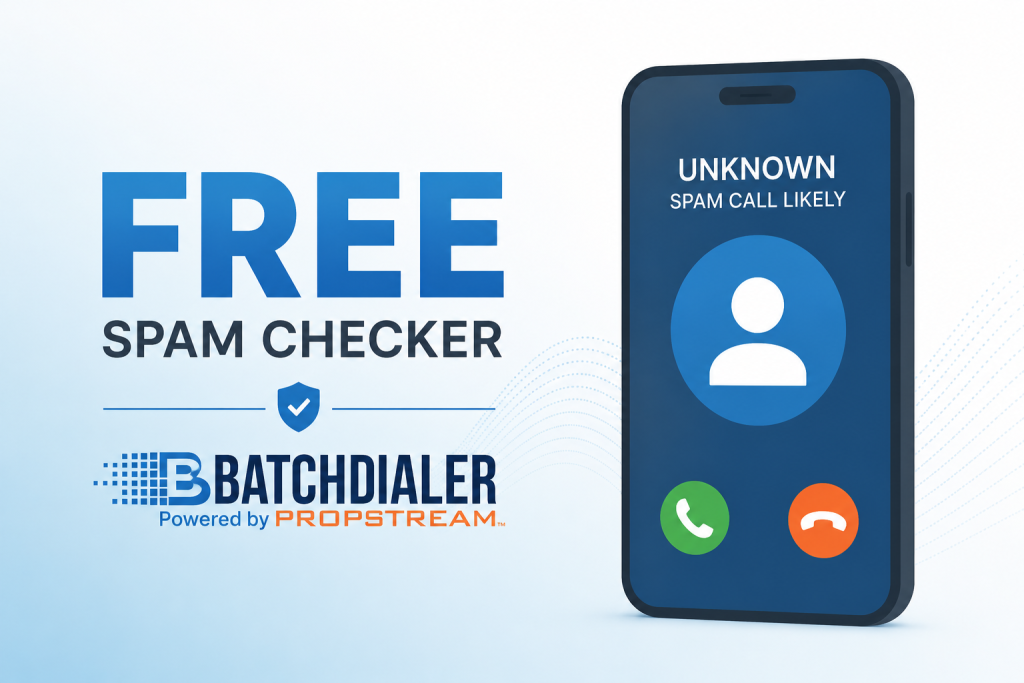
Pro Tip: Use BatchDialer’s Free Spam Checker to see if your number is flagged.
Phone Reputation Monitoring with Automatic Number Replacement
Phone Reputation Monitoring helps users proactively track the reputation of their outbound phone numbers across multiple carriers and reputation databases. Once a number is added, BatchDialer immediately begins monitoring its reputation status and displays a shield icon to indicate that monitoring is active.
The monitoring dashboard provides visibility into:
- Daily phone number reputation status
- Clean phone numbers that are currently being monitored
- Numbers flagged by reputation providers
- Numbers flagged within the past 24 hours
- Numbers flagged within the past 7 days
- Reputation Monitoring subscription usage
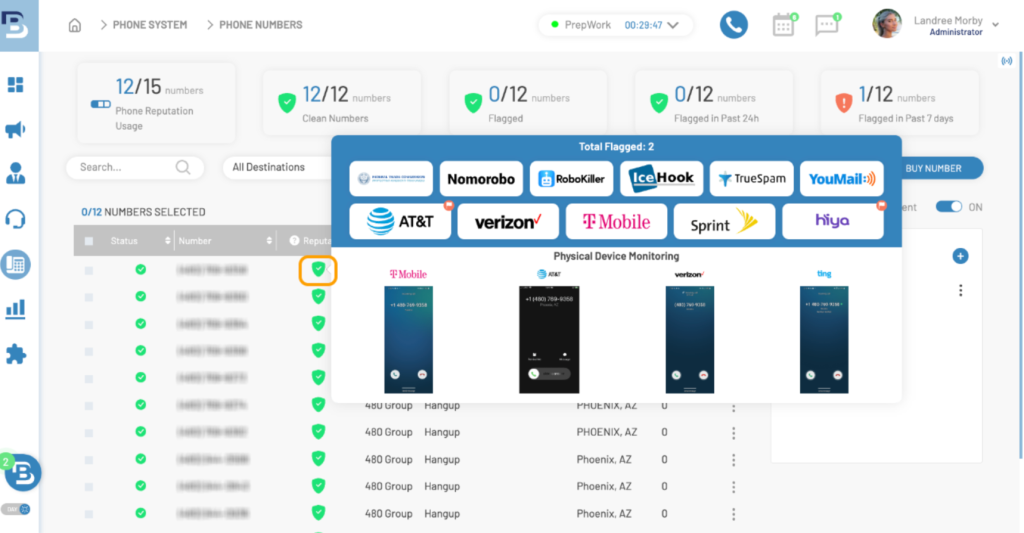
Users can also view provider-specific reputation results, which show how a phone number may appear across different carriers and reputation providers. This visibility can help identify potential issues before they impact outbound calling performance.
For additional protection, BatchDialer includes Automatic Number Replacement. When Phone Auto-Replacement is enabled, any monitored number that becomes marked as spam can be automatically replaced, helping maintain active outreach campaigns with less manual intervention.
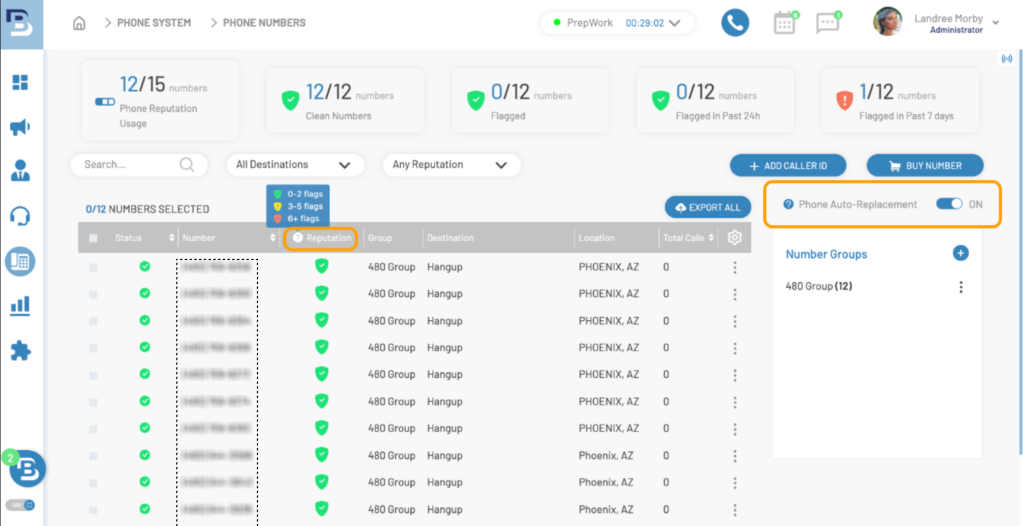
Plans support monitoring and unlimited automatic replacements for up to 100 phone numbers, making it easier for teams to manage caller reputation at scale.
Note: All BatchDialer plans include Phone Reputation Monitoring; Automatic Number Replacement is available on Pro and Enterprise plans.
| Note: Compliance starts with a clean list. BatchDialer includes DNC and Litigator Scrubbing tools that help users scrub leads against the Federal Do Not Call (DNC) Registry, maintain internal DNC lists, and exclude specific phone numbers, area codes, or states before launching a campaign. |
BatchDialer Remediation: One-Time Business Verification
BatchDialer Remediation helps businesses take a proactive approach to protecting caller reputation through a one-time business verification process. Designed to complement Phone Reputation Monitoring, verified business phone numbers can help reduce the likelihood of spam labeling, improve answer and connection rates, and enhance outbound dialing performance.
Key Benefits:
- One-time business verification process
- Automatic coverage for existing and future phone numbers
- Supports both BatchDialer and externally purchased phone numbers
- Helps reduce the likelihood of spam labeling
- Works across major carriers
- No additional cost for remediation verification
| Note: BatchDialer Remediation is available free on all BatchDialer plans. |
Smart Local Presence: Dial with a Local Caller ID
When running campaigns in a specific geographic market, the caller ID displayed to prospects should feel familiar and relevant. Smart Local Presence automatically matches your outbound caller ID to the local area code you are dialing, helping create a more localized calling experience and increasing answer rates.
Available in both Preview and Predictive Dialing modes, Smart Local Presence intelligently selects the outbound phone number that best matches the prospect’s area code, city, or state. If an exact match is unavailable, BatchDialer automatically uses the next closest available number.
Here’s why that matters:
- Familiarity builds trust: People are often more likely to answer calls from numbers that appear local.
- Supports higher answer rates: Local caller IDs can create a more recognizable calling experience than out-of-area numbers.
- Compliance-friendly: Smart Local Presence uses legitimate, carrier-approved phone numbers that your business owns or leases.
It’s important to note that Smart Local Presence is not caller ID spoofing. Caller ID spoofing involves misrepresenting a caller’s identity, which is prohibited under FCC regulations. Smart Local Presence uses legitimate phone numbers associated with your BatchDialer account to select the most geographically relevant number for each call.
| Note: Smart Local Presence is available on BatchDialer Advanced & Enterprise plans. |
Related Read: How Smart Local Presence Supercharges Call Center Performance
Lead Generation & Prospecting Workflows
The success of any outbound campaign depends on the quality of the leads behind it. BatchDialer’s lead generation and prospecting tools help users find targeted opportunities, organize contacts, and seamlessly move leads into calling campaigns.
Lead List Add-On: Access Ready-to-Call Motivated Seller Leads
The Lead List Add-On allows users to generate and import eight ready-to-call motivated seller leads directly within the platform, helping teams move from lead sourcing to outreach faster.
Users can search by city, ZIP code, county, or state and build lists based on specific property types, including single-family homes, condos, townhomes, and multifamily properties. Once generated, leads can be assigned directly to a BatchDialer campaign and prepared for immediate outreach.
Available lead types include:
- Failed Listings
- FSBO (For Sale By Owner)
- Pre-Foreclosures
- Tax Delinquent Properties
- Vacant Properties
- Absentee Owners
- Out-of-State Owners
- Tired Landlords
To help maintain clean data, BatchDialer also provides flexible duplicate management options during import:
- Reject: Prevents duplicate contacts from being imported.
- Keep Old: Retains existing phone numbers while importing new contact information.
- Keep New: Replaces the existing phone number with the newly imported number.
Whether you’re looking for distressed properties, motivated sellers, or absentee-owned opportunities, the Lead List Add-On helps streamline lead acquisition and reduce the time spent sourcing prospects.
| Note: Lead Lists are available as an add-on for all BatchDialer plans, with packages ranging from 2,500 leads for $49/month to 10,000 leads for $119/month. |
Push-to-BatchDialer: Seamless API Sync from PropStream to BatchDialer
For users who rely on high-volume outbound calling but prefer to use PropStream for list building, Push-to-BatchDialer enables seamless synchronization between the tools. Through a native API connection, users can send skip-traced* leads directly from PropStream into active BatchDialer campaigns without exporting files, reformatting spreadsheets, or manually uploading contacts.
This integration is particularly valuable for investors, wholesalers, and acquisition teams that depend on consistent lead flow and high-volume calling operations. By eliminating manual data transfers, teams can spend less time managing lists and more time connecting with prospects.
With Push-to-BatchDialer, users can leverage PropStream’s data-driven lead generation and BatchDialer’s advanced dialing ecosystem in one seamless workflow.
Push-to-BatchDialer Highlights:
- Native API connection between PropStream and BatchDialer
- Direct push of skip-traced leads into BatchDialer campaigns
- No exporting, reformatting, or manual uploads required
- Clean transfer of contact and phone number data
- Admin controls for team access and permissions
- Push leads directly from My Properties and My Contacts
| Note: To use Push-to-BatchDialer, users must have active PropStream and BatchDialer subscriptions and configure the BatchDialer API Sync within PropStream. As an added benefit, active PropStream users can receive 20% off any BatchDialer monthly plan for life when signing up directly through PropStream. |
Related Watch: How To Push Contacts Into Batchdialer From PropStream
| Pro Tip: Already using a CRM or lead management platform? Integrating BatchDialer with tools like Podio, HubSpot, BatchLeads, or Zapier can help automate data transfers, reduce manual entry, and keep your outreach workflow running smoothly. Learn more about BatchDialer’s integrations |
Reporting & Analytics: Monitor Performance at Every Level
BatchDialer provides a comprehensive reporting suite designed to help teams monitor activity, measure performance, and identify opportunities for improvement. From individual agent productivity to campaign-level results and phone number performance, users can access detailed reporting tools that provide visibility across every stage of the outbound calling process.
Available Reports Include:
- Campaign Reports – Measure campaign performance and outreach results.
- Agent Reports – Track individual agent activity and productivity.
- Number Reports – Monitor performance across phone numbers.
- Heat & Floor Map – Visualize team activity and status in real time.
- Time in Status Reports – Understand how agents spend their time throughout the day.
- Recent Contacts – Review recently dialed contacts and interactions.
- Missed Call Reporting – Track and filter missed inbound opportunities.
- Scheduled Reports – Automatically deliver reporting insights to your team.
| Want to dive deeper? Explore BatchDialer’s Knowledge Base to learn more about Reporting. |
Team Management & Live Call Monitoring
BatchDialer provides managers and team leaders with additional tools to oversee agent activity, support live conversations, and maintain quality standards across calling campaigns. Whether managing an in-office team or a distributed workforce, supervisors can stay connected to agent performance in real time.
Team Productivity Stack Includes:
- Call Listening – Monitor live calls without interrupting the conversation.
- Call Whisper – Provide guidance to agents during live calls that only the agent can hear.
- Call Barge – Join active calls when direct intervention is needed.
- Administrator & Agent Roles – Assign permissions and control access based on responsibilities.
- Team Oversight Tools – Manage campaigns, monitor activity, and support agents more effectively.
A Power Dialer Designed for Modern Outbound Calling Teams
Modern outbound calling requires more than just a way to make calls. Teams need quality leads, efficient dialing workflows, caller reputation protection, reporting, integrations, and tools that help agents stay productive throughout the day.
BatchDialer brings these capabilities together in a single platform. Whether you’re a real estate investor, wholesaler, acquisition team, sales organization, or contact center, BatchDialer provides the tools needed to connect with more prospects while spending less time managing workflows.
Experience everything BatchDialer has to offer with a 7-day free trial and discover how a more efficient calling operation can help your business scale.
FAQs
1. Which dialing mode is best for my business?
BatchDialer offers Predictive Dialing, Preview Dialing, and Rapid Fire Mode. Predictive Dialing is best for high-volume outreach, Preview Dialing is ideal for personalized conversations, and Rapid Fire Mode helps teams maximize calling efficiency on large campaigns.
2. Who typically uses BatchDialer?
BatchDialer is commonly used by real estate investors, wholesalers, acquisition teams, real estate agents, sales organizations, debt collection teams, insurance professionals, and outbound contact centers.
3. How many numbers can BatchDialer dial at once?
BatchDialer’s Predictive Dialing mode can dial up to five numbers simultaneously, helping teams increase call volume and reduce agent idle time.
4. How does BatchDialer help protect caller reputation?
BatchDialer includes Phone Reputation Monitoring, Automatic Number Replacement, BatchDialer Remediation, Smart Local Presence, and DNC/Litigator Scrubbing tools to help users maintain healthier caller reputation and outbound calling performance.
5. What is BatchDialer Remediation?
BatchDialer Remediation is a proactive business verification feature that helps users proactively protect their phone numbers from spam labeling. A single verification can provide ongoing coverage for future phone numbers added to the account.
6. Does BatchDialer offer lead generation tools?
Yes. The Lead List Add-On provides access to eight lead types, including FSBOs, Pre-Foreclosures, Tax Delinquent Properties, Vacant Properties, Absentee Owners, and Tired Landlords.
7. Can I send leads directly from PropStream to BatchDialer?
Yes. Push-to-BatchDialer allows users to send skip-traced leads directly from PropStream into BatchDialer campaigns via a native API, eliminating manual exports and uploads.
8. Does BatchDialer integrate with other software?
Yes. BatchDialer supports integrations with popular platforms such as PropStream, Podio, BatchLeads, HubSpot, and Zapier to help automate workflows and streamline lead management.
9. What reporting tools are available in BatchDialer?
BatchDialer offers Campaign Reports, Agent Reports, Number Reports, Heat & Floor Maps, Time-in-Status Reports, Missed Call Reporting, Scheduled Reports, and other analytics tools to help teams monitor performance and productivity.
10. What AI features are included in BatchDialer?
BatchDialer’s AI tools include Real-Time Call Guidance, Automatic Call Categorization, and AI-Generated Call Summaries, helping agents reduce manual work and stay focused on conversations.
11. Can BatchDialer help improve answer rates?
Yes. BatchDialer offers several features designed to support stronger answer rates, including Smart Local Presence, Phone Reputation Monitoring, Automatic Number Replacement, and BatchDialer Remediation. Together, these tools help improve caller trust and reduce the likelihood of spam labeling.
12. What is Smart Local Presence?
Smart Local Presence automatically matches your outbound caller ID to the prospect’s area code, city, or state. This helps create a more localized calling experience while using legitimate, carrier-approved phone numbers associated with your BatchDialer account.
13. Does BatchDialer support compliance-first calling?
Yes. BatchDialer includes DNC and Litigator Scrubbing tools that help users scrub leads against the Federal Do Not Call (DNC) Registry, maintain internal suppression lists, and exclude specific phone numbers, area codes, or states from future campaigns.
14. Can BatchDialer monitor if my number is flagged as spam?
Yes. BatchDialer’s Phone Reputation Monitoring feature tracks phone number reputation across multiple carriers and reputation providers. Users can also use the Free Spam Checker to determine whether a phone number has been flagged as spam.
15. Is Phone Reputation Monitoring included with every plan?
Yes. Phone Reputation Monitoring is included with all BatchDialer plans. Automatic Number Replacement is available on Pro and Enterprise plans and automatically replaces monitored numbers marked as spam.
PropStream engages an independent third-party to perform skip tracing.